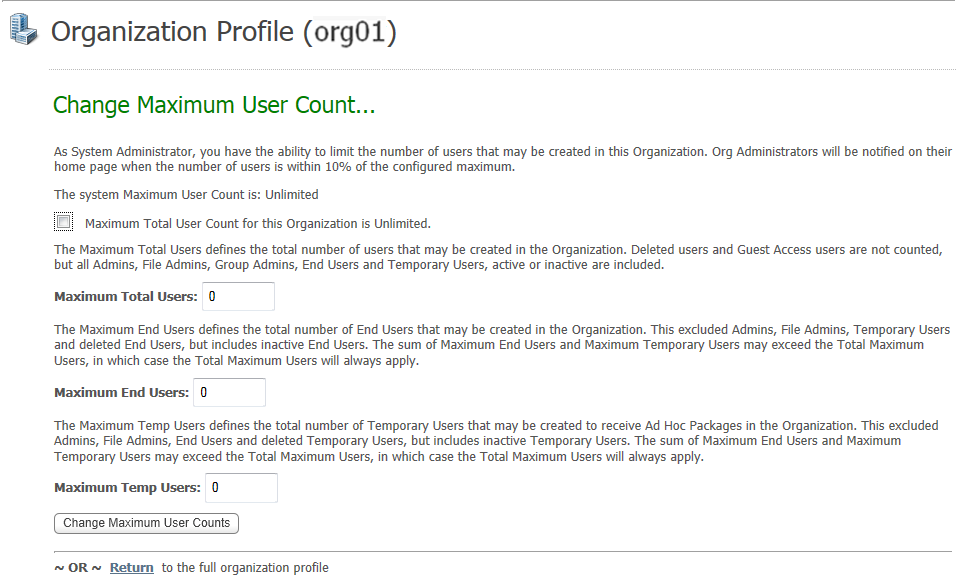
The Change Maximum User Count page enables the SysAdmin to optionally configure the maximum user counts for the particular organization.
As System Administrator, you have the ability of limit the number of users that may be created in this Organization. (Org Administrators will be notified on their home page when the number of users is within 10% of the configured maximum.)
The default for unlimited licenses is that the "system Maximum User Count" is "Unlimited" and the check box for "Maximum Total User Count for this Organization is Unlimited" is selected.
Clear the check box and three additional fields are displayed.
Maximum Total Users: The Maximum Total Users defines the total number of users that may be created in the Organization. Deleted users and Guest Access users are not counted, but all Admins, Group Admins, End Users and Temporary Users (active and inactive) are included.
Maximum End Users: The Maximum End Users defines the total number of End Users that may be created in the Organiation. This excludes Admins, File Admins, Temporary Users and deleted End Users, but includes inactive End Users.
Note: The sum of Maximum End Users and Maximum Temporary Users may exceed the Total Maximum Users, in which case the Total Maximum Users will apply.
Maximum Temp Users: The Maximum Temp Users defines the total number of Temporary Users to receive Ad Hoc Packages that may be created in the Organization. This excludes Admins, File Admins, End Users and deleted Temporary Users, but includes inactive Temporary Users.
Change Maximum User Counts - After entering new values, click this button to apply the changes.
Return - Click this link to return to the Organization Profile page.