Configuring Discovery Settings
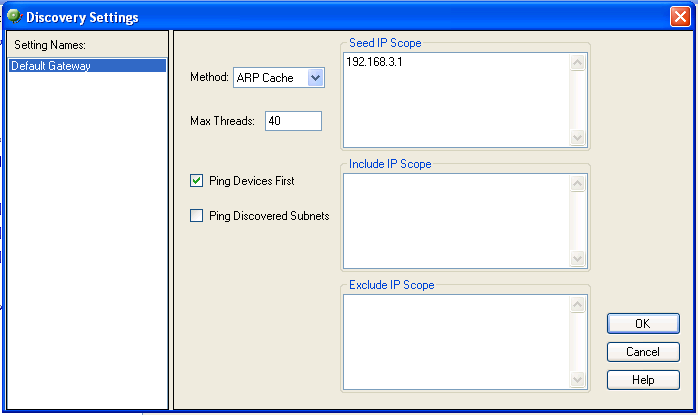
A network discovery requires a general collection of settings to define a network discovery scope. Use the Discovery Settings to edit discovery collection settings, select a discovery configuration from the list of network discovery collections, or enter information for a new discovery collection.
Creating, renaming, or deleting discovery collections
To create a new discovery collection:
- In the left pane, right-click the discovery collection name you want to change, then click New. The New Discovery Settings dialog appears.
- Enter a discovery collection name, then click OK. The new discovery collection appears in the list.
To rename a discovery collection:
- In the left pane, right-click the discovery collection name you want to change, then click Rename. The Rename Discovery Settings dialog appears.
- Enter the new discovery collection name, then click OK. The new name appears in discovery collection list.
To delete a collection:
In the left pane, right-click the discovery collection name you want to delete, then click Delete. The discovery collection list is deleted.
To configure the Discovery Settings:
- From the main menu of the WhatsConnected console, select Configure > Discovery Settings. The Discovery Settings dialog appears.
- Enter the discovery options in the following fields:
- Method. Select the discovery type to use (ARP Cache or Ping Sweep) for the scan. For more information about the discovery types, see Running a Layer 2 Network Discovery.
- Max Threads. Enter a number for the max number of threads to use while running the discovery scan. This indicates the number of separate threads to run in the background as WhatsConnected attempts to communicate with the devices on the network.
Note: If you are concerned about the load discovery could place on the network, you can reduce the number of Max Threads to cut back on the concurrent network communication.
- Ping Devices First. Select this option to indicate whether a successful ICMP ping is required before trying any other type of communication with the device.
- Ping Discovered Subnets. Select this option to indicate that you would like to run a Ping Sweep through each discovered subnet when running an ARP Cache discovery. This option does not apply for a Ping Sweep discovery.
- Seed IP Scope. Enter the IP address that defines where the network discovery will start. Seed IP Scope defines the range of IP addresses where network discovery starts a scan. In a Ping Sweep discovery, these addresses are contacted with an initial ICMP request. In an ARP Cache discovery, these addresses are queried for SNMP data. The discovery engine reads SNMP data from these devices and continues to scan the network for additional devices based on the SNMP responses from the seed devices.
Example IP scopes:- A single IP address - 10.0.0.1
- A range of IP addresses - 10.0.0.1-10.0.0.100
- A subnet range of IP addresses - 10.0.0.1/24 or 10.0.0.1/255.255.255.0
- Include IP Scope. Enter the IP range that defines the addresses in which to include in the network scan. Leave this option blank if you do not want to limit the network scan.
- For the Ping Sweep Discovery option, Include IP Scope is the same as the Seed IP Scope.
- For the ARP Cache Discovery option, Include IP Scope indicates an IP address range that the network scan should attempt to discover.
Example
- A single IP address (i.e. 10.0.0.1)
- A range of IP addresses (i.e. 10.0.0.1-10.0.0.100)
- A subnet range of IP addresses (i.e. 10.0.0.1/24 or 10.0.0.1/255.255.255.0)
- Exclude IP Scope. Enter the IP range that defines the range of IP addresses to exclude from the network scan. Leave this box blank if you want to include all IP addresses in the network scan.
- For the Ping Sweep Discovery option, Exclude IP Scope might be an IP range of servers or workstations that are a subnet of the Seed IP Scope.
- For the ARP Cache Discovery option, Exclude IP Scope indicates an IP address range that the network scan should not attempt to discover.
Click OK to save changes.