Using the Remote/Central workspace reports
While the Remote Site workspace reports work very much like workspace reports in WhatsUp Gold Standard and Premium Editions, there are a few items to note about the reports that help you identify them as Remote/Central workspace reports rather than local network workspace reports.
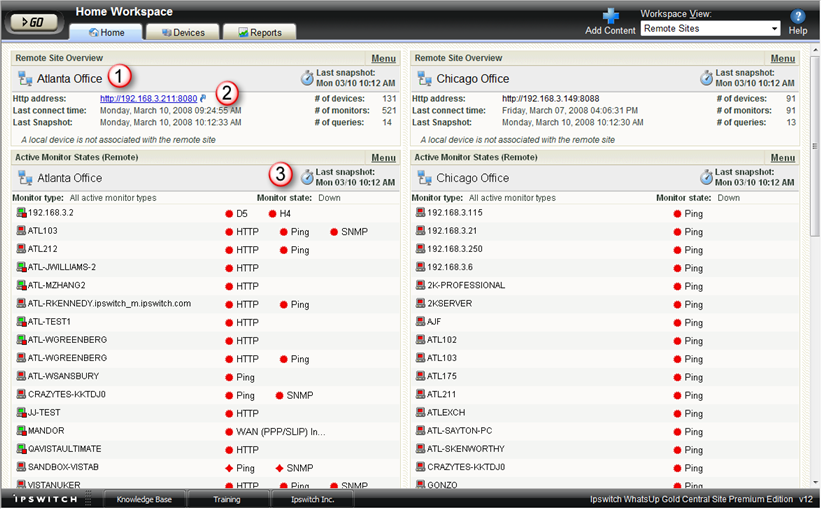
- The Remote Site workspace report header includes a network icon next to the Remote Site name to differentiate the Remote Sites from the local network devices (see 1).
- When you mouse over a Remote Site name, address, group name, status, etc., a shortcut icon
 displays to indicate that you can click to drill through the information on the Remote Site (see 2). When you click the shortcut icon , a new web browser window opens for the selected Remote Site.
Important: Make sure that you select the option Access Remote Reports for each user that you want to provide access to the Remote Site reports. Also, make sure that you select the option Configure Remote Sites if you want a user to be able to access and change options in the Configure Remote Sites dialog (Go > Configure > Configure Remote Sites). For more information, see Configuring user accounts.
- The Last snapshot information indicates the last date and time the Remote Site data was sent to the Central Site (see 3).
- The date and time information turns blue if it has been longer than 5 minutes since the remote site last updated.
- The date and time information turns red if it has been longer than 10 minutes since the remote site last updated.