Address Masquerading
 How to get here
Address Masquerading
User's Address Masquerading allows system administrators to configure IMail to replace the domain portion of an email address in the headers of messages as they are received by the SMTP Service. After messages are accepted for delivery by SMTP the system checks the headers of the message for any values listed in the Address Masquerading settings. If a match is found then that header line is rewritten with the value specified.
The following header lines are checked and updated if a match is found.
- From
- Sender
- Reply-To
- To
- CC
- Disposition-Notification-To
- Return-Receipt-To
Usage Example
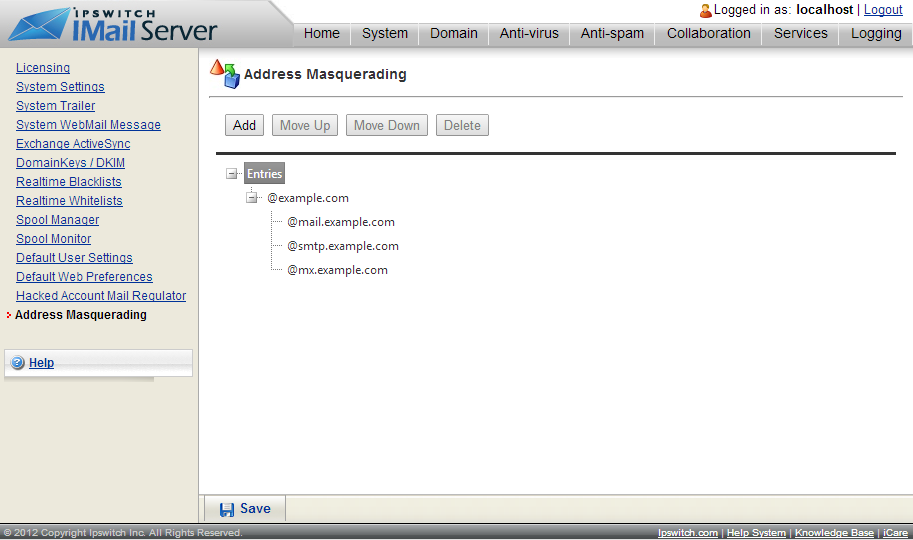
Given the example configuration above. The admin@mail.example.com and admin@mx.example.com addresses in the below message chunk would be transformed to admin@example.com.
From: "Admin” <admin@mail.example.com >
To: <admin@mx.example.com >
Subject: test
Date: Mon, 11 Aug 2014 17:11:43 -0400
Message-ID: <014101cfb5a8$da4916f0$8edb44d0$@mail.example.com >
MIME-Version: 1.0
Content-Type: multipart/alternative;
boundary="----=_NextPart_000_0142_01CFB587.5337C510"
Would updated to...
From: "Admin” <admin@example.com >
To: <admin@example.com >
Subject: test
Date: Mon, 11 Aug 2014 17:11:43 -0400
Message-ID: <014101cfb5a8$da4916f0$8edb44d0$@mail.example.com >
MIME-Version: 1.0
Content-Type: multipart/alternative;
boundary="----=_NextPart_000_0142_01CFB587.5337C510"