Configuring Websites for the Web Client
The "Websites.xml" file is a configurable XML file to maintain websites that are visible at the bottom of the web client navigation tree as shown below.
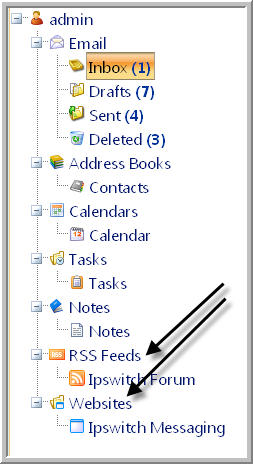
The "Websites.xml" file is located at
"...\Program Files\Ipswitch\IMail\WebDir\WebClient v2\App_Data"
Websites entered in this XML file will display in all user's navigation panel under the Website node. When a site is selected it will open in a new web client tab. Some websites have code in place to prevent being opened with frames. Please be sure all listed sites within the XML file are tested to verify they all correctly open in a new web client tab.
By default a website URL is not set and will not display. It is up to the IMail Administrator to decide what website should be added to activate this feature. Once added and saved this link will display globally for all web client users.
Adding a Website
To add a new website, copy the tags from "<website>" to "</website>" and insert before the "</externalsites>" tag.
Example
<externalsites>
<website>
<title>Ipswitch Messaging</title>
<url>http://www.imailserver.com/</url>
<iconfile></iconfile>
</website>
<website>
<title>Ipswitch, Inc.</title>
<url>http://www.ipswitch.com/</url>
<iconfile></iconfile>
</website>
</externalsites>
Related Topic