Configuring RSS Feeds for the Web Client
The "RssFeeds.xml" file is a configurable XML file to maintain global RSS Feeds for all web client users. RSS Feeds are visible at the bottom of the web client navigation tree as shown below.
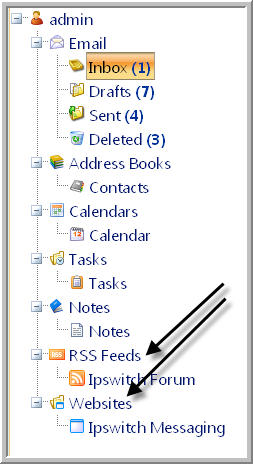
The "RssFeeds.xml" file is located at
"...\Program Files\Ipswitch\IMail\WebDir\WebClient v2\App_Data"
RSS Feeds entered in this XML file will display in all user's navigation panel under the RSS Feeds node. When an RSS Feed is selected it will open in a new web client tab.
By default RSS Feeds are not set. It is up to the IMail Administrator to decide if an RSS Feed should be added to activate this feature. Once added and saved this link will display globally for all web client users before any personal user's RSS Feeds that a user may have setup.
Note: All RSS Feeds within this XML file can not be modified or deleted by user's via the Web Client.
Adding an RSS Feed
To add a new RSS Feed, copy the following tags and insert before the </rssfeeds> tag.
<feed>
<title>The MX Record</title>
<url>http://blogs.imailserver.com/feed/</url>
<iconfile></iconfile>
</feed>
Related Topic